
Moscow skyline
Nearly 2,000 custom objects depict the centre, from the Kremlin and Red Square to railway stations, bridges and towers.
Moscow, Russia Map
FSX, FSX: Steam Edition & Prepar3D
Follow the Moskva River past the Kremlin, then fly on to the airports surrounding the Russian capital.
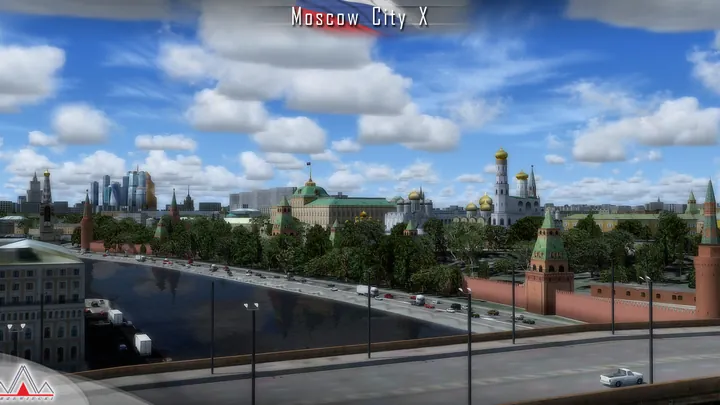
Nearly 2,000 custom objects depict the centre, from the Kremlin and Red Square to railway stations, bridges and towers.
Aerial imagery covers roughly 4,000 square kilometres, with the highest resolution in the city centre.
Optional airport models, ground vehicles and parked aircraft surround Moscow. Airport and aircraft options can be switched individually.
The Spasskaya Tower clock and Kremlin heliport feature in a detailed model of Red Square.
Seasonal and night textures cover the city, with custom terrain mesh and road traffic.
A narrated Cessna 172 mission recreates the 1987 arrival near Red Square, with a period livery and custom animations.


Designed for FSX, FSX: Steam Edition, Flight Sim World and Prepar3D. Works with Drzewiecki Design, Orbx, PILOT’S and MegaScenery. Disable overlapping airport scenery for the same location.
Install SimObject Display Engine (SODE), then run the scenery installer. It registers the scenery in the simulator library. Run it again to change options. The manual covers removal.
Customer support has ended for this edition. No further updates will be released.
Moscow grew around a bend in the Moskva River, with the Kremlin on high ground above its northern bank and Red Square immediately outside the walls. Follow the river west on a map and the low historic centre gives way to the high-rise business district. Farther around the bends are stadiums, parks and the wooded slopes at Sparrow Hills.
The city spread in a succession of rings. The Boulevard Ring and Garden Ring trace former lines of fortification, while major roads radiate outward from the centre. Railway lines converge on separate terminal stations around the inner city. Together with the river crossings, these routes make the pattern of Moscow’s growth particularly clear from the air.
Its aviation geography extends well beyond those rings. Vnukovo lies southwest of the centre and Domodedovo is farther to the southeast. Smaller airfields and sites associated with flying clubs, industry and aircraft development occupy other parts of the metropolitan area. On a flight across Moscow, the outlying airfields, suburban districts and dense riverfront form three distinct parts of the same landscape.
Included airfields · UUWW, UUDD, UUBW, UUMO, UUBM, UUMU, UUMB


